Card Settings for Grazertrack Subscriptions
Having trouble with your Grazertrack subscription payment?
If your subscription payment is being declined, please check the following:
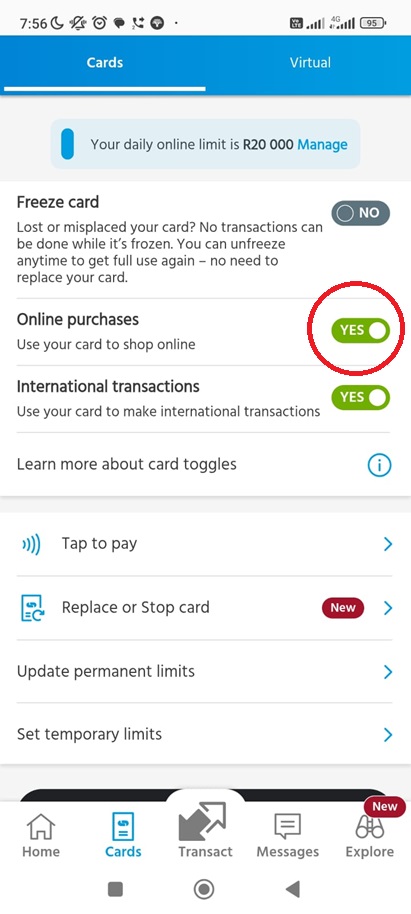
1. Enable online purchases
Your card must be enabled for online purchases, as Grazertrack subscription payments are processed as online card transactions.
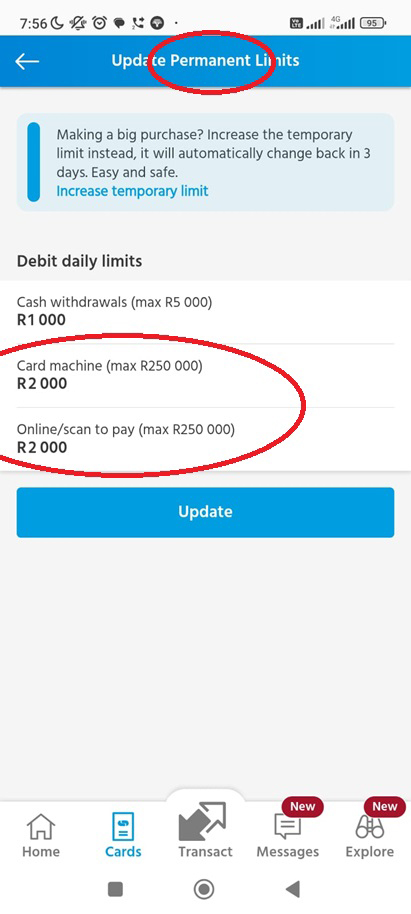
2. Check your permanent card limit
Make sure your permanent card limit is high enough to cover your Grazertrack subscription payment. Having sufficient funds available is not enough if your permanent card limit is too low.
3. Make sure there are sufficient funds available
Please ensure that your card has enough available funds when the subscription payment is processed.
4. Use a physical card
Please use your physical bank card when adding your payment method. Virtual cards should not be used for Grazertrack subscription payments.
Once these settings have been checked, your subscription payment should process successfully.
Capitec Card Settings
Please make sure your “Online Purchases” option is enabled. And make sure your Permanent Limits for Online/Card is sufficient to cover your subscription as well as other transactions you might have.